Born for the
DETAIL
The perfect tool for producing digital textures and scans of architectural partials.
UP TO 1600 POINTS
Detected with maximum detail
INSTANT VIEWING AND SHARING
Displays the relief in time in an instant


Automatic mode
Position the instrument at the optimal location for the survey, connect it via Bluetooth to your smartphone or tablet, and start scanning: the device will scan the space 360° and produce a detailed floor plan directly on your screen.
Scan details: LASER sensor – points detected 64 – area 6 m – scan time 2 minutes
Partial automatic
It is important to set the sampling density carefully: a high value increases Survey detail but slows down scanning. To reduce time, it is best to conduct a partial Survey or select a density that is appropriate for the characteristics of the feature to be surveyed.
Scan details: LASER sensor – points detected 457 / 1066 / 1600 – area 1.2 m – scan time 4 minutes
Manual mode
You choose what you are interested in detecting: place the laser pointer on the first point to be detected and decide which points to join next, using the motion keys. Manage the floor plan at any time and choose whether to share it or store it on your smartphone or tablet.
Scan details: LASER sensor – surface area 3.4 m – scan time 60 seconds
Distance meter mode
Using the instrument as a distance meter is simple and intuitive: simply activate this mode from the APP and press the side button on the device to take the measurement.
Real-time mode
The instrument also functions as a continuous distance meter: it starts a continuous survey by using the app’s play button. The measured data will be displayed on the screen of your smartphone or tablet and continuously updated in real time.
Automatic mode
Position the instrument at the optimal location for the survey, connect it via Bluetooth to your smartphone or tablet, and start scanning: the device will scan the space 360° and produce a detailed floor plan directly on your screen.
Scan details: LASER sensor – points detected 64 – area 6 m – scan time 2 minutes
Partial automatic
It is important to set the sampling density carefully: a high value increases Survey detail but slows down scanning. To reduce time, it is best to conduct a partial Survey or select a density that is appropriate for the characteristics of the feature to be surveyed.
Scan details: LASER sensor – points detected 457 / 1066 / 1600 – area 1.2 m – scan time 4 minutes
Manual mode
You choose what you are interested in detecting: place the laser pointer on the first point to be detected and decide which points to join next, using the motion keys. Manage the floor plan at any time and choose whether to share it or store it on your smartphone or tablet.
Scan details: LASER sensor – surface area 3.4 m – scan time 60 seconds
Distance meter mode
Using the instrument as a distance meter is simple and intuitive: simply activate this mode from the APP and press the side button on the device to take the measurement.
Real-time mode
The instrument also functions as a continuous distance meter: it starts a continuous survey by using the app’s play button. The measured data will be displayed on the screen of your smartphone or tablet and continuously updated in real time.
Compatible with all CAD design software


FREE DEDICATED APP
With the dedicated application you can also combine multiple scans into a single DXF file and create a photographic record for your Surveys.
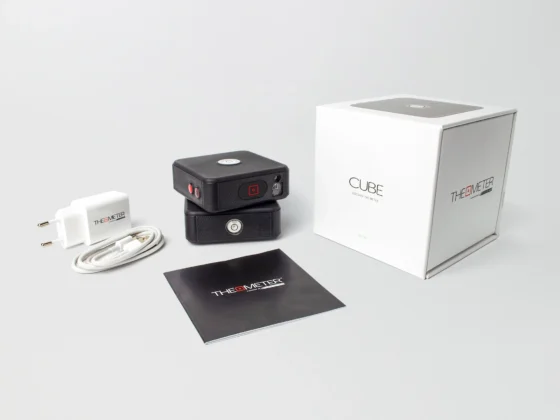
What contains
The package includes the charging kit to charge the device.
It is always advisable to use the supplied charger.